Remote monitoring
School Bell can send structured JSON events to a remote syslog server and provide read-only HTTP status and health endpoints. Both features are optional. Monitoring failures do not stop the bell scheduler.
Choose the HTTP endpoint when another monitoring system only needs to poll one node’s current health. Choose syslog with Graylog when events from many bells must be collected, searched, shown on a dashboard and used for alerts. Both can be enabled together.
Add monitoring only after the node rings correctly on its local schedule. This makes it clear that Graylog is an operational aid and not a runtime dependency.
Configuration
Configure every Raspberry Pi with a unique device_id. Labels make it easy
to group multiple bells by school, site or zone in Graylog.
{
    "monitoring": {
        "device_id": "main-bell-01",
        "labels": {
            "school": "example",
            "zone": "main"
        },
        "heartbeat_interval": 300,
        "syslog": {
            "host": "graylog.example.com",
            "port": 1514,
            "protocol": "udp",
            "facility": "daemon"
        },
        "status": {
            "enabled": true,
            "host": "0.0.0.0",
            "port": 8080,
            "token": "replace-with-a-secret",
            "include_systemd": true
        }
    }
}
protocol accepts udp or tcp. Local stdout/journal logging remains
active when remote syslog is configured. The complete monitoring token is
never returned by the API or included in structured events.
heartbeat_interval is expressed in seconds and defaults to 300. Every
heartbeat contains the same device_id and labels, allowing Graylog to
detect one silent Raspberry Pi independently from all other bells.
Structured syslog
Every remote record includes stable fields suitable for Graylog indexing:
{
    "application": "school-bell",
    "hostname": "pibell-main",
    "device_id": "main-bell-01",
    "version": "1.2.3",
    "event": "bell_ring",
    "status": "success",
    "timestamp": "2026-08-28T08:30:00+00:00",
    "level": "info",
    "message": "bell ring",
    "label_school": "example",
    "label_zone": "main",
    "config_hash": "f72a...",
    "config_hash_short": "f72a93cb815c",
    "schedule_hash": "a54d...",
    "schedule_hash_short": "a54d92730b64",
    "schedule_entry_id": "4c81...",
    "trigger_id": "83f2...",
    "planned_at": "2026-09-07T08:30:00+02:00",
    "local_date": "2026-09-07",
    "weekday": "Monday",
    "timezone": "Europe/Brussels",
    "wav_key": "0",
    "gpio_pins": [26, 20]
}
Stable event names include service_started, service_stopped,
schedule_loaded, schedule_entry_loaded, bell_ring,
bell_skipped_holiday, bell_skipped_calendar, calendar_refresh,
calendar_error, gpio_test,
gpio_activated, gpio_deactivated, remote_trigger, and
health_status. GPIO and bell events include only the selected pins. Their
gpio_active_high value is a boolean when every selected relay has the same
polarity, a pin-aligned boolean list for mixed polarities, or null when no
relay matches. Remote-trigger events include the remote host, WAV
key, duration and a consistent success or failure status. Calendar events use
calendar_source to distinguish openholidays from ical. Refresh
events include cache state, last-success time, item count and duration. Fetch,
parse and evaluation failures use calendar_error with an
error_category and never include the configured calendar URL.
config_hash identifies the complete supplied JSON configuration, while
schedule_hash identifies only its schedule section. Both are computed
from canonical JSON before runtime-only values are added. Scheduled results
share a trigger_id across local, remote, skipped and failed events.
Their corresponding config_hash_short and schedule_hash_short fields
contain the first 12 characters for display only; exact comparisons continue
to use the complete hashes.
schedule_entry_loaded exposes the non-sensitive weekday, time, WAV key and
stable entry identifier needed to inventory expected schedule entries. Raw
configuration values and credentials are never included in these events.
HTTP API
The server runs in a background thread and only accepts GET requests.
Binding to 0.0.0.0 exposes it to the network. Prefer a firewall and bearer
token whenever the network is not fully trusted.
curl -H 'Authorization: Bearer replace-with-a-secret' \
  http://pibell-main.local:8080/status
curl -H 'Authorization: Bearer replace-with-a-secret' \
  http://pibell-main.local:8080/health
/status returns the current version, device identity, uptime, schedule,
trigger hostnames, GPIO pins, last ring, last error and a selected structured
subset of systemctl show. It never returns the full application
configuration, monitoring token or remote syslog settings.
/health returns HTTP 200 while the scheduler is healthy and HTTP 503 when
it is not. A successful response is:
{"status": "ok"}
Graylog
The repository includes a reusable Graylog package; you do not need to build a dashboard and parsing pipeline from scratch. The package is in the monitoring/graylog folder and contains:
school-bell-monitoring-content-pack.json— a Graylog content pack with the School Bell stream, parsing pipeline, School Bell Overview dashboard and event definitions for duplicate and failed planned bells;create-syslog-input.sh— optional helper for creating a UDP or TCP syslog input through the Graylog API;pipeline-rule.conf— the JSON parsing rule for inspection or manual installation;send-test-event.py— sends realistic events without needing a Pi;DASHBOARD.md— complete widget, query and alert reference;README.md— the detailed package installation and verification guide.
The package extends an existing Graylog installation; it does not install or host Graylog itself. The content pack file can be downloaded directly from the repository when the documentation is being read separately from a source checkout.
The higher-level monitoring folder also contains a concise overview of both monitoring mechanisms. These repository files supplement this Read the Docs chapter and are intended to be used directly by an administrator.
How the Graylog flow works
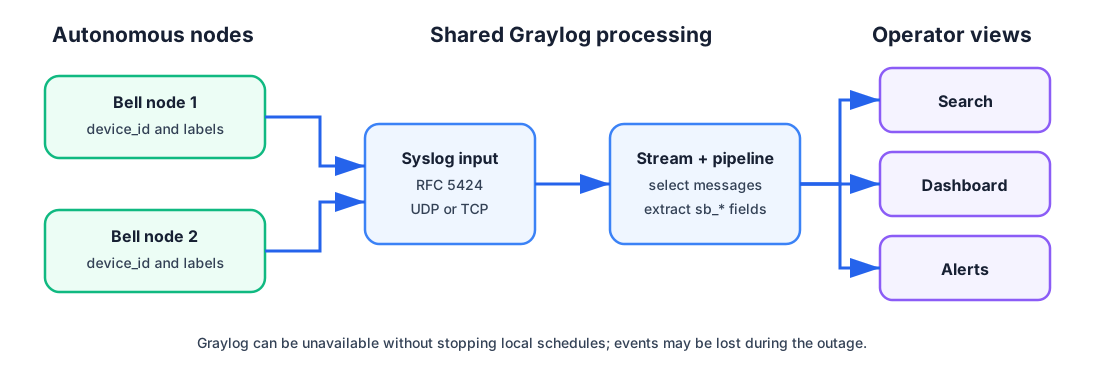
All nodes can share one input and processing path while retaining their own device identity and labels.
Each Pi sends an RFC 5424 syslog record containing a JSON event. A shared
Graylog syslog input receives records from every Pi. The supplied stream
selects only School Bell messages, and the supplied pipeline extracts JSON
properties into searchable fields prefixed with sb_. The dashboard and
event definitions then use those fields.
For example, application device_id becomes sb_device_id and label
school becomes sb_label_school. Graylog’s native fields, including its
timestamp and original message, remain intact for diagnosis.
Install the supplied package
On the Graylog server, create an RFC 5424 UDP or TCP Syslog input. A single shared input can receive all School Bell nodes. The repository helper can create a global input when a suitable Graylog API token is available:
export GRAYLOG_URL=https://graylog.example.com
export GRAYLOG_TOKEN=replace-with-api-token
export GRAYLOG_INPUT_PORT=1514
./monitoring/graylog/create-syslog-input.sh
Set
GRAYLOG_PROTOCOL=tcpbefore the command to create a TCP input.Allow the chosen port through the Graylog host firewall. Configure the same host, port and protocol in every Pi’s
monitoring.syslogobject.Import
school-bell-monitoring-content-pack.jsonthrough Graylog’s content pack interface and install it. The pack deliberately contains no input, credentials or environment-specific notification destination, so those remain under local administrator control.Send two simulated devices from a checkout of the repository:
python3 monitoring/graylog/send-test-event.py \
  graylog.example.com 1514 \
  --device-id main-bell-01 --hostname pibell-main
python3 monitoring/graylog/send-test-event.py \
  graylog.example.com 1514 \
  --device-id yard-bell-01 --hostname pibell-yard
Add
--protocol tcpwhen the input uses TCP.Open the School Bell Overview dashboard and confirm both simulated devices. Then restart one real bell and wait for its
service_started,schedule_loadedandhealth_statusevents.
Useful searches
Search all School Bell events:
sb_application:school-bell
Limit the result to a device or school:
sb_application:school-bell AND sb_device_id:main-bell-01
sb_application:school-bell AND sb_label_school:example
Find failures or compare deployed schedule revisions:
sb_application:school-bell AND sb_status:failure
sb_event:schedule_loaded AND sb_schedule_hash_short:abc123def456
The dashboard package already includes widgets for reporting bells, recent
heartbeats, installed versions, successful rings, failures, skipped bells,
GPIO activity, remote triggers, configuration revisions and schedule
inventory. The accompanying DASHBOARD.md explains every widget and gives
additional alert queries.
Understand alert limitations
An event-based system can alert on a reported failure, but a powered-off Pi
sends no failure event. Detect offline bells by checking whether each expected
device_id has sent a recent heartbeat. With the default five-minute
interval, the packaged ten-minute “Bells reporting” view tolerates one missed
message.
Similarly, Graylog can find duplicate or failed planned executions using a
trigger_id. Proving that a completely absent scheduled ring was missed
requires central knowledge of the expected schedule and calendar; a simple
zero-result event query is not enough.
Troubleshoot missing events
Check the path in order:
inspect
journalctl -u school-bell.serviceon the Pi;confirm DNS and routing from the Pi to the Graylog host;
confirm UDP/TCP, port and firewall match the Graylog input;
use
send-test-event.pyto separate Graylog configuration from Pi setup;search the input’s raw messages before debugging the pipeline;
confirm the content pack is installed and its pipeline is connected to the School Bell stream.
UDP is simple and low-overhead but can lose messages without acknowledgement. TCP provides delivery feedback but does not add encryption. Use a trusted network, VPN or suitable TLS-capable syslog proxy when events cross an untrusted network.